Intro
The world has no shortage of build systems, and picking one of the many available options certainly can’t be a bad choice. That didn’t stop me from writing my own for the Rookery anyways.
This post isn’t here to convince you to do the same, but hopefully provide some insights into why you might want to consider rolling your own build system, and some implementation tips (read. expect pointers, but not a full-blown implementation guide). My hope here is to inspire a new perspective on how these build tools can work, or perhaps ought to work.
What’s in a build system
Assuming you’ve used a tool like Cmake, Meson, premake, UnrealBuildTool, Sharpmake, or some equivalent before, you probably already have a decent intuition for what a build system does. Even so, it can be helpful to enumerate a build system’s responsibilities.
In a nutshell, a build system is responsible for:
- Scanning your workspace to discover targets to build (a target is typically something like a DLL, library, or executable but some build systems support a more abstract notion of a target also).
- Providing some mechanism for configuring those targets. Common properties include:
- Target source files
- Custom compiler flags
- Custom linker flags
- Target dependencies
- Other custom build rules (execute Order 66 after the build finishes)
- Determining if a target is out-of-date due to any of the following reasons:
- A target property has changed
- A target source file has changed
- A target dependency was also out-of-date
- An output expected when building the target is missing
Many build systems also shoulder the burden of maintaining IDE support files needed to edit the project. After all, the configuration needed to drive a build typically overlaps a lot with the configuration needed to communicate to IDE language services how to parse and index code. Cmake, for example, can be instructed to emit Visual Studio solution and project files, compile_commands.json files, or support files for other IDEs.
In fact, it's probably technically more accurate to call Cmake a "meta-build" system since it doesn't perform the build itself. Instead, Cmake delegates the process of invoking the compiler and linker as needed to other tools such as MSBuild or Ninja to name a couple.
Build systems delegate the job of actually compiling source code and linking libraries and executables to toolchains, which you can think of as a collection of tools that do each individual activity (compiling, linking, archiving, etc.). Some toolchains like Clang have a single CLI frontend “driver” that interprets the CLI args to determine which tool in the toolchain to run. Toolchains are typically bundled with compiler runtimes, standard library headers, or any other support files needed to get the job done. Some (but not all) build systems often abstract the interface to the toolchain or automate various aspects. This is why you can write a CMakeLists.txt file, and have your project compile with either the MSVC toolchain or the Clang toolchain without too much fuss, assuming you didn’t intentionally add toolchain-specific configuration.
What makes a build system “good”
The previous section described what I would consider table stakes for a build system. Let’s talk about what makes a build system good. At this point, I’m going to be unapologetically opinionated, so consider yourself warned.
In my mind, a good build system…
- … is almost configuration-free to do 99% of what I need.
- … actually builds things (without delegating to some external tool like MSBuild or Ninja).
- … let’s me add and remove files from the project and have it be immediately picked up by my editor without a restart.
- … doesn’t rebuild the universe if I fat-finger a change and undo it later.
- … is so fast that it imposes next-to-zero overhead relative to the actual build.
The trouble with existing options is that all of them are quite good in some respects, but all of them seem to completely drop the ball in others. If you’ll indulge my complaining for a bit, perhaps some of these complaints resonate with your own experiences.
There are a few other nice-to-haves for me also. Being able to hit F5 in Visual Studio and have the build system automatically compile code as needed before launching the program and attaching the debugger is unquestionably convenient. It’d also be nice to automatically handle app manifests, DLL copies to the target directory, and other idiosyncrasies that are difficult (or at the very least annoying) to set up in other build systems. Finally, it’d be nice if compiles didn’t obliterate the previous build to make A/B testing code a bit more convenient.
The Hatchery
While working on custom game engines isn’t anything new, this is the first time I was sufficiently motivated to implement my own build system also (I call it the Hatchery since it reminds me of this fellow).
The “pitch”
Here’s a quick rundown on its features. The Hatchery…
- … understands a simple declarative ini-like configuration file format to configure targets.
- … can scan an entire workspace with thousands of files and determine everything is up-to-date in under 8 ms.
- … invokes the compiler and linker directly during the build, with multicore support.
- … does not leverage
compile_commands.json, instead, preferring.clangdandCppProperties.jsonfiles for IDE support. - … treats DLLs as first-class citizens.
- … understands shaders and other asset types and can build assets using the same dependency-tracking system.
- … parses error output and consolidates duplicate errors together in the Visual Studio error pane.
- … is self-hosted (it can build itself) and debuggable.
The “hedge”
I’m cheating a bit of course. The Hatchery was developed within the span of a few weeks, so it clearly can’t span the feature set of incumbent tools. In particular, the Hatchery doesn’t yet…
- … support platforms that aren’t Windows.
- … support toolchains that aren’t Clang.
These aren’t minor limitations by any means, but neither of these constraints are insurmountable; in fact, the code is currently structured to make it easy for me to support console toolchains in the future, based on past experience porting engines to Xbox and Playstation. That said, the choice of Clang isn’t an accident either. Vanilla Clang or some flavor of Clang can actually target all the platforms I care about right now, so it may be the case that I don’t need to add additional toolchain support for a long time.
More hedging: I don't hate CMake or other such tools. As with most software though, it's quite possible to implement something significantly better for a narrower use case and targeted optimization. The maintainers of CMake have a really tough job, but ultimately, my vision for what a good build system does is too far afield of what's offerred by the primary tool everyone uses.
Perhaps the biggest constraint I can take advantage of that other options mentioned can’t enjoy is that I don’t plan on ever releasing the Hatchery. At least not anytime soon. Maintaining a project with customers or open-source users is an unquestionably taxing endeavor, and by building for yours truly, I can compromise aggressively in some areas, and be completely uncompromising in others.
Architecture
At a high level, the Hatchery operates in three phases of execution:
- Workspace scanning
- Target analysis
- Execution
Workspace scanning walks all the files of the project, accumulating metadata about file locations, modification times, and file sizes. Workspace scanning pays special attention to .target files, which encode information about a given target. Workspace scanning has an additional responsibility to update any IDE support files as needed depending on property changes.
During target analysis, .target files are parsed, and target properties are resolved. Once the shape of a target and its dependencies are understood, the target analyzer is responsible for determining whether the target is out-of-date or up-to-date. Out-of-date targets get an additional processing pass to prepare for execution.
Execution occurs if any discovered targets are out-of-date, in which case, targets are built in dependency order. Targets that have no direct dependency are evaluated in parallel wherever possible, up to a configurable concurrency limit. If execution is successful, the program terminates. If errors were encountered, the error text is parsed and consolidated into a report of structured errors. This report is consumed by a custom Visual Studio extension (did I mention this yet?), which populates errors with file/line metadata for easy navigation.
Let’s dig into each of these phases.
Workspace Scanning
Before we can do anything at all, we need some representation of a subset of the filesystem in memory. The core data structure of interest here is the DirectoryEntry.
struct DirectoryEntry
{
    Path const* path_ = nullptr;
    u64 size_ = 0ull;
    u64 mtime_ = 0ull;

    // Directory entries are stored in an array-like
    // structure that keeps elements stable in memory, but
    // is linearly addressable.
    i32 index_ = -1;

    // If this entry is a directory, this will be the index
    // of the first child entry.
    i32 first_child_ = -1;

    // This will refer to the parent entry for every
    // directory entry except the root node.
    i32 parent_ = -1;

    // This will refer to the next entry in the directory
    // (or remain -1 if no additional entries are present).
    i32 next_ = -1;
};
The structure above gives us all the information we need from the filesystem, while supporting important operations like enumerating entries in a folder, or navigating up and down the directory tree.
Path representation
The Path type is worth mentioning. Probably the most common representation of a file-path is something akin to a String. Perhaps a fancier path class may be represented as an array of path components, to make operations like pushing or popping components easier. As an example of one actual implementation, the std::filesystem::path in libcxx occupies 32 bytes and is essentially just a wrapper around a std::string (or a std::wstring in the case of Windows).
In the Rookery, paths are actually all fully interned in a single global tree. I have never seen this before in another codebase, but once implemented, it saved so much time and memory, I found myself surprised that this technique wasn’t more commonplace.
Given a folder structure like the following:
  A/
    B/
      b.txt
    C/
      c.txt
Each of the 5 entries above (3 directories, 2 files) would have a single Path instance in memory. These paths are connected by address in the same structure. If you parse a filepath (input from the user or some external source) several times, even on different threads, all of the results will map to the same Path object provided the same path was parsed (modulo filepath separators).
In this representation, paths themselves are immutable. If you append components to a path, for example, you get back references to child Path objects, but memory growth is bounded since all paths are interned in the global tree. Using the directory structure above for example, the following is possible:
// Assume A/ is the current working directory.
Path const& a = Path::cwd();

Path const& b = a / "b";

// b_text refers to A/B/b.txt
Path const& b_text = a / "b" / "b.txt";

Path const& b_text_1 = b / "b.txt";

// This assertion passes. The paths were constructed
// differently, but ultimately refer to the same
// path object in memory.
assert(&b_text_1 == &b_text);

Path const& b_text_2 = Path::parse("b/b.txt");

// This works also.
assert(&b_text_1 == &b_text);
Some of the perks of this representation:
- Path comparison is tantamount to pointer comparison. If the pointers match, the paths match too.
- Path storage costs just 8 bytes.
- Note that seeing the path contents imposes an additional indirection, but we often don’t care about the contents directly. It’s enough to be able to traverse paths or do other operations that don’t require access to the underlying string data.
As an aside, this path representation is useful not just in the context of the Hatchery, but throughout the Rookery also. I (ab)use this construct to efficiently manage assets that may originate not from a physical filesystem, but a virtual filesystem mounted in memory. This path representation works for things that aren't even files!
As a final addition, paths are all hashed to form a path identifier. The hash is cached for quick access, and path components are hash-combined such that the path ID computed in this way is fully platform dependent. All paths hashes are computed relative to the engine’s working directory, and a flag indicates if a path is “external” to the workspace. These hashes are used when storing paths in hash tables (pointers do not make suitable hash keys in my opinion, as they do not contain sufficient entropy). These hashes are also used to serialize paths if the human-readable path is not needed.
External paths relative to something other than the current working directory do require some special care, but thankfully, absolute paths are intentionally rarely used in the system.
Fast directory scanning
I currently live in a Windows world (although a native Linux port is on the docket in the future), so it’s super important to do things in a way that is performant on Windows. What does not work well is calling CreateFile on every file enumerated in each directory to create a file handle, followed by GetFileInformationByHandle to retrieve file metrics. This is in contrast to a Unix world where developers tend to just call stat on file descriptors when needed without much thought.
Instead I first create a directory handle, and then use NtQueryDirectoryFileEx to retrieve all directory children in a single syscall. Conveniently, the metadata returned with each directory entry includes the file size and modification time, which is all we need for our purposes. I was originally introduced to this technique in this post from Sebastian Schöner and can confirm that this method is significantly faster than the FindFirstFile approach.
Scanning hundreds of files in this way takes a few milliseconds or so, and this constitutes a third of the time needed to determine that there’s “nothing to do” in the event that no targets are out-of-date. If this became a bottleneck in the future (when we’re drowining in the “success” of hundreds of thousands of files), the scan can actually be parallelized, since scanning different directories can occur at the same time.
It’s worth noting that I scan the entire project directory, including build artifacts. This is important because the Hatchery needs to understand if an expected build output (like a library, PDB, or some other byproduct) is missing. The build artifacts also include files that encode dependency information, so it’s important that we can locate these files later during target analysis.
(A brief aside on FRNs)
With the FILE_ID_BOTH_DIR_INFORMATION argument, NtQueryDirectoryFileEx can also be instructed to return the FRN (file reference number) which is a unique identifier for each file in the volume. The FRN is also the ID you need to correlate a given file with entries in the USN journal (Update Sequence Number journal). You might think that this is the perfect identifier to use for handling not just file stamping, but also as a future mechanism for listening to file changes in a live-editing context.
Well, I implemented this along with USN journal parsing/monitoring, and ultimately decided this was not worth the trouble, for a few reasons.
First, while the FRN is indeed unique per file, many tools actually move files and operate on a copy-on-write principle for backup or undo purposes. Visual Studio is one such tool. After saving files, I noticed that while the file location was identical, the actual identity of the file had changed.
Second, while USN journal monitoring is extremely fast, it has its own drawbacks. For one thing, you can’t open a handle to the volume containing the USN journal without administrative privileges, so you have to run your process in elevated mode. The popular Everything tool gets around this by performing the USN monitoring in a Windows service, and consuming the data in a non-elevated user process. However, managing IPC on top of everything else would certainly impose a good deal of additional complexity.
Elevation requirements aside, directory scanning with NtQueryDirectoryFileEx is so fast, I realized that I could just broadcast a system-wide event once to indicate that “something” had changed, and scan all directory entries to see what the changes actually were.
OK, back to your regularly scheduled programming…
File indexing
While traversing files, the scanner also examines the extensions of each file to assign a FileType. At the moment, the Hatchery understands the source files I care about (C, C++, ISPC, HLSL), as well as configuration files for targets, shaders, and other asset types. When launched to build the engine or game though, the Hatchery obviously doesn’t bother paying any attention to files it knows it won’t use later.
After scanning completes, we are left with a Workspace data structure that contains:
- All directory entries containing files that might be of interest
- File size, modification time, and paths for each entry
- A lookup table to quickly query for all files of a given
FileTypeof interest.
At this point then, we are ready to move onto…
Target Analysis
A target is defined by a file with a .target extension. This file must be the only target file in its directory subtree. Here’s an example:
# hello_world.target

[dependencies]
core
… yup, that’s a full target file (I’ll show you a less trivial example later). Assuming the file above was named hello_world.target and placed in a hello_world folder somewhere, the Hatchery would implicitly look for all sources contained in hello_world/src and indicate those as source dependencies. Platform-specific source files are also gathered from hello_world/platform/[platform]/src, if this folder is present.
Furthermore, this newly defined hello_world target depends on the core target, so it gets some additional configuration for free:
- The
hello_worldtarget will have bothhello_world/incandcore/incin its include path (include any additional include paths provided bycore, if any). - When compiling for a specific platform (e.g.
windows), the Hatchery also implicitly includeshello_world/platform/windows/incandcore/platform/windows/incin the include path. - When compiling the modular build (with DLLs and dynamic linkage instead of static linkage),
hello_worldwill have the preprocessor directiveRK_CORE_APIdefined to__declspec(dllimport). Furthermore,RK_HELLO_WORLD_APIwill be defined to__declspec(dllexport)for targets that depend onhello_worlddownstream.
As written, the hello_world target is actually treated as a library. To make it compile as an executable instead, we need to add just one top-level property.
# hello_world.target
exe

[dependencies]
core
As an exectuable, any .manifest XML files in the hello_world/src folder will also be linked into the final artifact (useful for doing things like declaring DPI-awareness, UAC elevation requirements, stamping build versions, and so on).
Other .target section headers include:
includes: used to add additional include pathscompile_options: used to add additional compiler options/flagslink_options: used to add additional linker options/flagsdefinitions: used to supply additional preprocessor definitionsextra_files: used to specify additional files to copy to the destination folder if modified since the last copy
How are properties marked public or private? Platforms?
Easy. Here’s an abbreviated example of the target containing the DX12 backend implementation.
# gpu_dx12.target

[includes.private]
microsoft.direct3d.d3d12.1.618.5/include

[link_options.private]
-ld3d12
-ldxgi
-ldxguid
All properties except extra_files accept a .public or .private suffix. By default, the property section is used to indicate public properties, so .public can be omitted in the common case.
The full section pattern actually looks like:
[<property>.<public|private>.<debug|release|*>.<platform|*>]
# Properties
An asterisk can be used to mean “anything works here.” So for example,
[definitions.public.*.windows]
FOO=1

[definitions.public.release.*]
BAR=1
With the section above, the FOO preprocessor definition will be set to 1 for the parent target only on Windows, but for any configuration. On the other hand, BAR will be set to 1 for any platform, but only when building the release configuration.
I don’t have a Ph.D. in computer science, but I’m fairly confident my .target file representation isn’t Turing complete, heh. The simplicity of this format is possible because, unlike other general purpose build tools, the Hatchery imposes a specific file structure to derive all the work needed for each target.
Property resolution and response files
To compile a given source file for a specific target, all relevant properties must be gathered from every direct and indirect upstream dependency. If C depends on B which depends on A, files in C will not compile unless public properties from A are also considered as part of the build. After all, headers in B will include headers from A, and this inclusion is visible to files in C.
To achieve this, targets are analyzed in dependency order to propagate and merge properties from dependencies to dependents. In the example above, all of the public properties of A would first merge into the set of resolved properties in B. Then, C would only need to examine the resolved propertes of B thereafter, since the influence of A was already taken into account.
The set of resolved properties are hash-combined in an order-independent way to produce a signature that changes dramatically if any property changes.
Finally, the properties are turned into a set of compiler and linker arguments that are emitted for each target in response files. A response file is a fancy word (coined by M$) for “text file containing whitespace-separated command line arguments.” Response files are supported by all major compilers, and the handy thing we can do is translate the properties to compiler and linker flags and dump them into separate .rsp files for use later.
Response files are actually important for correctness also. Without them, you are very liable to run into the command line string limit on Windows, which sits at 32,767 characters (including the NUL-terminator).
Stale checks
At some point while doing all this scanning, parsing, and property merging, we need to figure out what we should actually execute.
Each target, when built, is expected to also emit a set of .meta files which contains information about every recorded dependency. This includes:
- Dependent source objects and libraries that were linked (from upstream targets, or external libraries)
- Dependent headers in the case of
metafiles associated with source compilands - The response file used to compile an object file or link a library
Embedded in these meta files are file path IDs (the path hashes mentioned earlier), but also file timestamps and checksums. Checksums are only recorded for source text files below a fairly generous size limit. The meta files also record all expected outputs and byproducts of the corresponding job.
As targets are configured, associated meta files are read from disk and examined to determine if any aspect of the target needs to be rebuilt. There is one meta file for each source file, separate meta files for each response file, and a meta file for the final artifact (library or executable) of each target.
To determine if a file dependency is stale, the Hatchery first compares timestamps and sizes. If the size changed, the file changed, and the associated job is out-of-date. If the timestamp changed, the file might be different, but we first see if a checksum was recorded. If so, we compute the checksum of the file as it exists now, and compare that against the recorded checksum. If the checksums match, we update the timestamp, and consider the job up-to-date. If the checksums don’t match, we now are convinced the file changed, and we save the checksum to record in an updated meta file later if the job succeeds.
So... why bother with checksums? Well, if there's anything I hate more than long build times, it's longer build times. A checksum is extremely fast to compute relative to compiling even a small file, so even if the checksum prevents excess compilation 1 out of 100 times, it's already paid for itself.
Not to mention that if you're going to compile the code anyways, the act of computing the checksum has the side-effect of warming up the disk cache since all those bytes are going to be read regardless. The difference in running time for a build job with and without checksums is something I can't discernibly measure, although you do want to pick a fast hashing algorithm suitable for the job.
It's also extremely satisfying to make changes in some global core header, undo it, save, hit build, and see an "up-to-date" message in 7 ms (let me indulge in a little bragging here please!).
A job is also considered out-of-date if any of its expected outputs as indicated in the meta file are missing.
When a target is marked out-of-date, all its dependents are marked out-of-date also. Note that this doesn’t mark the source compile jobs of the dependents out of date, just the final link job.
As mentioned before, the Hatchery is built on the same core data structures and systems used by the engine. As such, it can benefit from shared serialization facilities for doing things like writing and reading meta files from disk. How this is done will be the subject of a future post.
Execution
Assuming something was marked out-of-date, we can proceed to actually compile and link stuff.
Compilation
There are a few things I didn’t know about Clang before starting this project. I know these things now, and soon you will too.
- The
-MF <file>flag can be used to emit dependency information to the file given by<file>. The usage of-to meanstdoutis a common Unix convention, but this works on Windows also. I pass-MMD -MF -to each invocation ofclangto have header dependency information emitted instdoutfor me to parse in memory. I use-MMDspecifically because I’m not interested in tracking timestamps for system headers and such (if I upgrade the toolchain, I just clean the project and rebuild). - Compiler and linker errors are emitted to
stderr. When spawning the process, I redirectstderrto file to grab and parse later. I’ve found that its handy to have this on disk somewhere as opposed to piped to some editor output window where it may get stomped on by something else. - The
-fdiagnostics-formatflag can be used to change how output diagnostic information is formatted on error. Using-fdiagnostics-format=msvcformats file line and column number information using the MSVC convention. This is handy if you parse output from other M$ tools that also emit file line/col info. - Passing arguments via response file to
clangworks just like withmsvc. You just use@<path-to-rsp-file>and any args in the response file specified are processed by theclangdriver along with any other args you supply.
Linkage
Here are some corresponding tips for linking as well:
- When archiving a static library, I use
llvm-arwith theTdirective. This creates a “thin” directive that simply references object files on disk, as opposed to copying all the symbols/code to create a library you would actually distribute. I can do this because when compiling static targets, I only use the static intermediate libraries as logical groupings of objects, and I don’t intend to ship these. - When using
llvm-ar, you probably need therdirective also. This will cause the archiver to replace existing symbols as opposed to strictly appending them. I didn’t realize this flag existed, and was really puzzled to find that the build would break “sometimes” with a duplicate symbol error. The root cause was that I was appending symbols into a leftover archive from a previous build. In addition to using the replace directive, I also now migrate the old library to avoid ever linking against code I didn’t intend to. - A subtle behavioral difference exists between linking object files into a DLL, and linking object files transitively via an archive. Object files linked into a DLL are not stripped, even if the constituent symbols aren’t referenced. This is not true of an object referenced in an archive. When the archive is linked later, if a constitute object isn’t referenced, it isn’t included. This can cause correctness issues if the object had
staticobjects that had side-effects on construction. As a workaround, you can pass-Wl,-wholearchiveto the linker to embed all objects referenced by an archive unconditionally.
Beyond the tips above for compiler and linkage usage, something that was helpful when I started was simply examing how other build tools like CMake and MSBuild invoked the compiler to get a sense for usage. Thereafter, it wasn’t too difficult to get a prototype working before tweaking the end-result to be what I needed.
Parallelization
I didn’t mention this above, but aside from compilation and linkage, the target analysis was also performed fully in parallel.
Because the Hatchery is built on top of the same code that is used in the Rookery, parallel work is modeled on top of the same system, which will be the subject of a future post.
The specific things perhaps worth mentioning:
- Linkers these days are actually multithreaded, but I found that executing links in parallel was still worth it anyways. Depending on how the dependency graph is structured, it’s unlikely that a lot of targets could be linked in parallel anyways, but your mileage may vary depending on machine, target topology, and code size.
- For my codebase, a typical source file compilation requires ~120 MiB of working memory, so I am not actually memory bound. This is only the case because I am very very very very particular about forward declarations, minimal header inclusion, and judicious PCH usage. In other engines I’ve worked on that did not exercise this discipline, a single compiland could require 2-3 GiB to compile, which would require strict concurrency limits during compilation. In the Hatchery, I blast every core.
I care so deeply about compilation time (and code size) in fact, that every single one of the data structures used in the Rookery is designed with compilation time and code size in mind (on top of other things obviously).
For the record, I recognize that I can be this... uncompromising shall we say, because I am a solo developer. On a large AAA team, I found enforcing these constraints and maintaining compilation times at acceptable levels to be far more challenging.
For those keeping score, the Hatchery parallelizes .target parsing, dependency info deserialization and processing, target property resolution, compilation, and linking. Only the initial scan remains single-threaded, although that’s something I may change in the future if needed. It may not appear that the phases prior to compilation and linking are worth parallelizing, but because these phases technically touch the disk to read metadata, I’ve found that letting different cores eat page faults to keep the OS busy was an important optimization. After all, the Hatchery is designed to operate nearly-instantaneously in the common situation where there is zero to small amounts of work to do.
IDE Support
So far, we’ve only covered the “building” part of the story, and admittedly, building is a very important aspect of what a build tool does. But stopping here would still pose a ton of issues. As mentioned near the beginning, a crucial responsibility of a build system is tooling-related upkeep.
If you add new preprocessor definitions to a target file, or change compiler options, you probably want your IDE’s “intellisense” to be fully aware of how the file will be compiled. Doing this improperly (or not at all) is going to result in a lot of angry red squiggly lines because VS doesn’t know what RK_CORE_API means or what file #include is supposed to resolve to.
One option taken by a lot of custom build systems is to emit Visual Studio XML property files (solutions, project files, and property sheets). While this can certainly work, I find this solution entirely dissatisfactory. The main disadvantage is that the project and/or solution needs to be reloaded in VS after each change, and in my experience, this operation is so slow, it meaningfully changes my work habits, to the point where I’m consolidating build changes and source file additions to avoid staring at the agonizing “Reloading projects” dialog more than necessary.
Another common option is the usage of the compile_commands.json mechanism. This choice is also in wide use, and is the primary mechanism build systems like CMake use to communicate compiler flags to LSP servers for use in editors like VSCode, Vim, or any other editor that has an LSP integration. I’m unfortunately not a fan of this approach either, largely because I simply do not think the file format is well designed.
A brief compile_commands.json rant
Given a compile_commands.json file in any large project (IDK, take LLVM for example), it probably compresses extremely well. Why? Because the format encodes a unique set of compiler arguments for every compiland. IMO, this is an absurdly bad file format given that in pretty much every project, there will be large groups of files that compile with the same set of compiler options and flags.
In other words, 99.99% of projects out there are structured with some sort of hierarchy in mind, and compile_commands.json is structured without any hierarchy whatsoever. I think the file is perfectly suitable for prototyping perhaps, but I am somewhat puzzled by its widespread adoption, given the large efficiency gap between the way it models data, and the data it needs to represent.
My other beef with compile_commands.json is that it’s a file. A SINGLE FILE. The implication, of course, is that each time a change is made to any subset of the project, this entire file gets blasted into oblivion and rewritten by the build system. Then, the language server needs to note that a change occurred and reprocess each compiland’s command again to see what changed.
Finally, I have a bone to pick with the content encoded in an individual command within the file. For the most part, build systems emit the compile command as it would have been issued to clang or gcc directly (there’s an option to supply a JSON array of args also, but this isn’t in wide use that I know of). In either case, why does this need to be JSON in the first place? Why does clang.exe need to exist on each compile directive, thousands of times in the file?
All that is to say, I believe the community can do much better here, and thankfully, there are some other options that I will discuss shortly.
/rant
Using .clangd and CppProperties.json instead
Given that all source files within a target share the same target configuration (and hence, the same compiler flags), it’d be nice to be able to communicate this to the IDE as such.
Luckily, Visual Studio, supports a per-project CppProperties.json file that can be used to configure Intellisense for all files at and below the directory location. This is documented here.
The Hatchery writes and keeps a CppProperties.json file up-to-date adjacent to each .target file in the workspace. Instead of opening a solution file or project file, I work on the Rookery by simply pointing VS to the root folder using Visual Studio’s Open Folder workflow. Then, Intellisense is set up according to the nearest CppProperties.json file moving up the directory tree for every source file in the project.
The handy thing about this approach is that if I add new files to a source directory, no VS reloads/restarts are needed. Because the file is associated with an already existing CppProperties.json file, Intellisense works on the new file immediately. Coming from a project where this was not true, it’s hard to communicate just how much of a breath of fresh air this workflow is.
When .target files change, the Hatchery can be run with an --ide flag to simply update CppProperties.json files as needed and exit without building. VS picks up the change without needing to restart the IDE.
An identical workflow is possible with clangd, an LSP server maintained by the folks that maintain clang. The Hatchery can emit .clangd files adjacent to each .target also, although I tend to use this workflow less because the VSCode debugger is still too far behind VS for my needs. However, I’ve been very pleased with clangd so far, and hope to use it more soon, so it’s worth knowing this option is available.
Build and Run
Intellisense is one part of the tooling story, but IDE actions are the other part. VSCode, VS, and many other editors have handy commands to compile your project, launch the project with an attached debugger, clean the project, and so on.
Because I built my own build system, naturally, if I wanted this functionality, well, I’d have to build my own VS extension also.
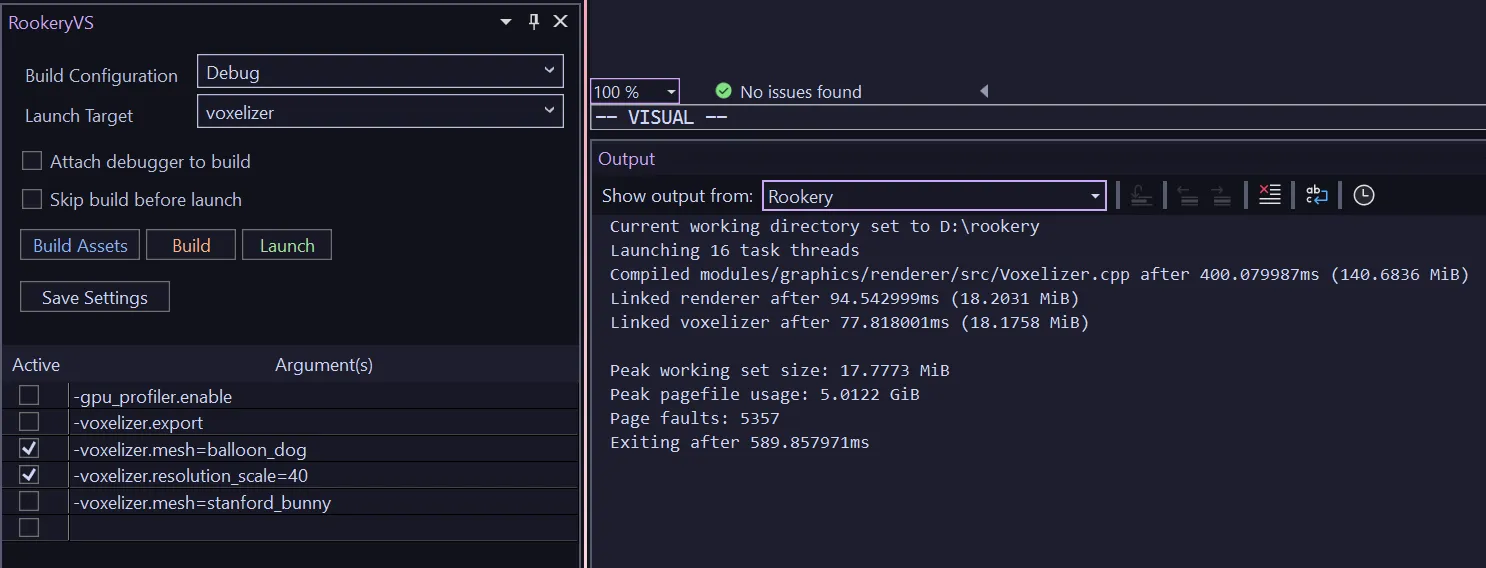
Pictured above is the custom extension on the left, docked below the (unpictured) solution explorer, adjacent to a custom output pane.
The extension lets me pick a build configuration, target, and launch the target with or without the debugger attached. The extension also communicates with the Hatchery to retrieve compilation errors to surface in the Error task pane.
One important thing the Hatchery does when it retrieves errors is that it deduplicates them. With most tools, when you author an oopsie in a profilically used header, you end up a deluge of compiler error spew. All of which typically has a singular root cause.
The hatchery takes error output and just shoves it in a hash table, before then re-emitting the error to the user. Very simple change, but massive QoL improvement.
The extension also has a handy widget towards the bottom that lets me write launch arguments I can enable or disable with a click. All the settings can be persisted in a local temp file as well.
Each of the actions mentioned (build, run, debug, etc.) are mapped to actual IDE actions, so I can bind my custom extension actions to standard hotkeys like F5, F7, and so on. F5 handling needs specific code to change behavior when the debugger is actually active. The extension invokes the debugger’s Continue action automatically if the debugger is active, and launches the requested executable otherwise. Launching a target builds it if necessary. Because this check occurs so quickly, there’s no downside to running the check each time.
As a disclaimer, writing this VS extension was probably one of the most painful coding tasks I’ve ever done in recent memory, so I may document the experience in more detail in the future in case someone else once to tread down the same path.
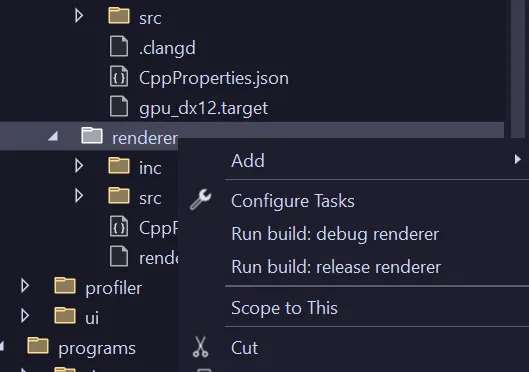
Another feature I added was extending folder context menus so I can build individual targets by right-clicking the parent folder and selecting the configuration I wanted to build (pictured above). This leverages the set of newer extension APIs oriented around VS workspaces, documented here.
Conclusion
Work on the Hatchery started around March 2026, and it took a couple weeks to get to the point where it could build basic projects, another week to be able to build itself, and at this point, I use it as a daily driver for development. I would say it’s been well worth the investment, in part because I have exactly one customer. Development of the Hatchery was accelerated somewhat because I already had a lot of constituent pieces needed while building out other parts of the Rookery, but overall, the project I would consider decidedly “doable” (certainly much easier than writing a renderer, physics engine, or compiler) with an impressive payoff once complete.
I hack on the project only very occasionally now that the foundation is there. In the future, the main changes I will make will be to support additional platforms.
I’ll close with a few more thoughts in case any readers are interested in doing this themselves:
- First, start by doing everything manually. Invoke the compiler and linker in a terminal and examine all the artifacts to get a better feel for how the tools work and behave.
- Second, be sure to really understand what compilers and linkers actually do. Having a conceptual basis really helps in the troubleshooting phase when trying to understand what went wrong. The classic text Linkers and Loaders is still an excellent resource to get the main ideas, despite being published in the 90s!
- Operate exlusively with relative paths wherever possible. Outside of creating the initial directory handle to scan the workspace, the Hatchery actually only ever uses relative paths from there on out. In fact, I can rename the entire project directory, hit build, and nothing will happen because all artifacts and metadata are encoded relative to the project root. Even intellisense will work correctly.
- Encode byproducts as text until you are confident in the system to use more efficient encodings.
- Pay attention to PDBs and proper debug symbol generation. These are ancillary to an actual working executable, but non-negotiable nonetheless.
Discuss this post on Patreon.